Saturday, December 22, 2018

Increasing Swap Size on Ubuntu

Some of the blogs on increasing swap size on Ubuntu provide incorrect information. For example, some blogs suggest using fallocate which will not work for certain file systems. For the details on which file systems fallocate does and does not work on, refer to the swapon/swapoff man page. We avoid this complexity by using dd.

There are many potential scenarios. In this particular case, swap is initially configured to 2 GB and we want to increase it to 16 GB.


All the commands below were executed on Ubuntu 18.04 LTS


  1. Check Ubuntu version
    1. Command: lsb_release -a
      1. Output
        No LSB modules are available.
        Distributor ID: Ubuntu
        Description:    Ubuntu 18.04.1 LTS
        Release:        18.04
        Codename:       bionic
        
      2. Check swap configuration
        1. Command: sudo swapon --show --bytes
          1. Output
            NAME      TYPE       SIZE USED PRIO
            /swapfile file 2147479552    0   -2
            
            
            1. Comment
              1. The size of 2,147,479,552 bytes is close to but does not exactly correspond to 2 GB (2,147,483,648). The option "--bytes" was used to illustrate that there will be differences and that should not be surprised by this. The discrepancy is so small that you should not worry about it. An explanation for the discrepancy is beyond the scope of this blog.
            2. Examine the metadata of the swap file
              1. Command: ls -lh /swapfile
                1. Output
                  -rw------- 1 root root 2.0G Oct 18 18:55 /swapfile
                  
                  1. Comments
                    1. Root should be the only user that can read/write to the swapfile. The above output confirms that this is happening.
                      1. Notice that the size of the swapfile is displayed as "2.0G".
                    2. Disable swap file
                      1. Command: sudo swapoff /swapfile
                        1. Output: None
                        2. Check swap configuration
                          1. Command: sudo swapon --show --bytes
                            1. Output: None
                            2. Add 14 GB to the existing swap file
                              1. Command: sudo dd if=/dev/zero of=/swapfile bs=1M count=14336 oflag=append conv=nocreat,notrunc,fsync status=progress
                              2. Output
                                14579400704 bytes (15 GB, 14 GiB) copied, 5 s, 2.9 GB/s 
                                14336+0 records in
                                14336+0 records out
                                15032385536 bytes (15 GB, 14 GiB) copied, 8.94244 s, 1.7 GB/s
                                
                                1. Comments
                                  1. Since the number of input bytes is 1M, need the count to be 14,336 (14 * 1,024).
                                    1. Used fsync to make sure that physically wrote output file as well as its associated metadata before finishing.
                                  2. Examine the metadata of the swap file
                                    1. Command: ls -lh /swapfile
                                      1. Output
                                        -rw------- 1 root root 16G Dec 22 15:44 /swapfile
                                        
                                        1. Comment
                                          1. Confirmed that the final swapfile size is 16 GB.
                                        2. Make swapfile usable
                                          1. Command: sudo mkswap --check /swapfile
                                            1. Output
                                              mkswap: warning: checking bad blocks from swap file is not supported: /swapfile
                                              mkswap: /swapfile: warning: wiping old swap signature.
                                              Setting up swapspace version 1, size = 16 GiB (17179865088 bytes)
                                              no label, UUID=9ec7f376-65ab-44f0-b40b-31b8e725f3b6
                                              
                                              1. Comments
                                                1. Don't worry about the warning "checking bad blocks from swap file is not supported". This is because the check can only be performed on block devices. In this particular case, the swapfile is not a block device.
                                                  1. The size of 17,179,865,088 bytes is close to but does not exactly corresponds to 16 GB (17,179,869,184). As stated previously, the discrepancy is so small that you should not worry about it.
                                                2. Enable swaping
                                                  1. Command: sudo swapon --verbose /swapfile
                                                    1. Output
                                                      swapon: /swapfile: found signature [pagesize=4096, signature=swap]
                                                      swapon: /swapfile: pagesize=4096, swapsize=17179869184, devsize=17179869184
                                                      
                                                      1. Comment
                                                        1. The size of 17,179,869,184 bytes corresponds exactly to to 16 GB.
                                                      2. Check swap configuration
                                                        1. Command: sudo swapon --show --bytes
                                                          1. Output
                                                            NAME      TYPE        SIZE USED PRIO
                                                            /swapfile file 17179865088    0   -2
                                                        2. Reboot
                                                          1. Check swap configuration
                                                            1. Command: sudo swapon --show --bytes
                                                              1. Output
                                                                NAME      TYPE        SIZE USED PRIO
                                                                /swapfile file 17179865088    0   -2
                                                                
                                                                1. Comment
                                                                  1. The reboot verified that fstab is properly configured for the swapfile.

                                                              References


                                                              Sunday, October 21, 2018

                                                              Python: Iterators - Yield Statement - Generators - Comprehensions

                                                              The topics of iterators, yield statement, generators and comprehensions are of interest to anyone that uses for loops, nested for loops and is concerned about the compactness of their code and it's associated performance.

                                                              The purpose of this blog post is to provide a single spot where an introduction to iterators, the yield statement, generators and comprehensions can be found. The introductions will be made by first starting with a code snippet and then providing an explanation. For those that are interested in the corresponding Python documentation, a reference section is provided at the end.

                                                              Below is a pictorial of our journey.


                                                              All code below was executed using Python 3.7.0.

                                                              Add Sequence Numbers to a List


                                                              We are going to begin by adding a sequence number to the items in a list


                                                              >>> seasons = ['Spring', 'Summer', 'Fall', 'Winter']
                                                              
                                                              >>> list(enumerate(seasons,start=10))
                                                              [(10, 'Spring'), (11, 'Summer'), (12, 'Fall'), (13, 'Winter')]


                                                              Create Enumerate Equivalent Function Using Yield


                                                              An equivalent function for enumerate is provided below.
                                                              def enumerate_function( sequence, start = 0 ):
                                                                  n = start
                                                                  for element in sequence:
                                                                      yield n, element
                                                                      n += 1
                                                              Next, let's exercise the above function.


                                                              seasons = [ 'Spring', 'Summer', 'Fall', 'Winter' ]


                                                              for sequence_number, season in enumerate_function( seasons, start = 20 ):
                                                                  print("The season ", season, " has been assigned a sequence number of ", sequence_number)
                                                              The generated output is:


                                                              The season  Spring  has been assigned a sequence number of  20
                                                              The season  Summer  has been assigned a sequence number of  21
                                                              The season  Fall  has been assigned a sequence number of  22
                                                              The season  Winter  has been assigned a sequence number of  23
                                                              Notice the yield statement in enumerate_function.

                                                              Let's examine the execution of the enumerate_function to determine what the yield statement is doing. The execution starts when the function is called and proceeds to the first yield statement. At that point in time, execution is suspended and the associated values are returned. During suspension, the full state of the function is retained. When the function is invoked once again, the execution of the function resumes immediately after the yield statement.

                                                              The above seems awfully complicated. You stop the execution of a function, you save its entire state, you return a value and you resume processing after the function is invoked once again. The cost of this added complexity is worth it because it reduces the amount of required memory. If the values are not generated as they are needed, they would have to be all created at the beginning and stored in memory. For large data sets, a large amount of memory would be required.

                                                              If a function has a yield statement, it is called a "generator function". It is important to differentiate between a "generator function" and a "normal function". In the former, the function can be executed many times; while the latter is executed only once.


                                                              For Illustrative Purposes, Replace For Loop with While Loop


                                                              The phrase "When the function is invoked once again" needs to be further explained. As usual, we are going to start with a code snippet. Specifically, we are going to replace the for loop in the enumerate_function with an infinite while loop helped by iter() and next().


                                                              Below is the updated code snippet.


                                                              def enumerate_function_rev_1( sequence, start = 0 ):
                                                                  n = start
                                                                  iterator = iter(sequence)
                                                                  while True:
                                                                      try:
                                                                          yield n, next(iterator)
                                                                      except StopIteration:
                                                                          break
                                                                      n += 1
                                                              Also, as usual, we will explain the concepts after providing a code snippet. The iter() function returns an iterator object. The next() function retrieves the next item from the iterator. The infinite while loop continues to retrieve data until the StopIteration exception is raised.

                                                              We originally added complexity to a for loop by introducing the yield statement. Now we have added more complexity by adding the concept of an iterator with its supporting functions. We are doing this for illustrative purposes only.

                                                              Here, we are trying to illustrate that under the hood, the for loop uses an iterator. Also, it provided an opportunity to introduce the concept of an iterator. The remainder of the blog post will expand on this concept. Please note that you should continue to use the for loop and not replace it with an infinite while loop.

                                                              By the way, the use of iterator with its supporting functions is commonly referred to as the "iterator protocol".

                                                              Iterator Performance Benefit: Less Memory Consumed


                                                              Why bother with the concept of the iterator protocol? The one word answer: performance. Please note that the preceding code snippets were only used to demonstrate concepts and were not intended to address performance concerns.

                                                              Below is a code snippet to generate 10 million numbers. When dealing with big data, this is not an unreasonable number.
                                                              
                                                              
                                                              import sys
                                                              
                                                              a_list = [1 for i in range(10000000) ]
                                                              a_generator = (1 for i in range(10000000) )
                                                              
                                                              sys.getsizeof(a_list)      # 81,528,056 Bytes
                                                              sys.getsizeof(a_generator) #        120 Bytes

                                                              The list requires 78 MB while the generator only requires 120 bytes. This is 679,400 times as much. Allocating over 600,000 times as much memory and doing this many times during processing will quickly impact performance.

                                                              The following is a quote from the Python official documenation: The superior memory performance is kept by processing elements one at a time rather than bringing the whole iterable into memory all at once. Code volume is kept small by linking the tools together in a functional style which helps eliminate temporary variables. High speed is retained by preferring “vectorized” building blocks over the use of for-loops and generators which incur interpreter overhead.

                                                              The idea that code volume is kept small by linking the tools together in a functional style will be demonstrated below with the dot product computation. Vectorization is beyond the scope of this blog. However, if this is of interest to you, a good place to start is "Look Ma, No For-Loops: Array Programming With NumPy" by Brad Solomon.

                                                              Use Dot Product Computation to Demonstrate Iterator Protocol


                                                              We can use the computation of the dot product to demonstrate the above. If you have list/vector a = [1, 3, -5] and list/vector b = [4, -2, -1], the dot product is "(1 * 4) + (3 * -2) + (-5 * -1)" which is equal to 3.

                                                              Below is a code snippet to implement the dot product


                                                              import operator
                                                              
                                                              a = [1,  3, -5]
                                                              b = [4, -2, -1]
                                                              
                                                              sum( map( operator.mul, a, b ) )
                                                              The key to understanding the above code snippet is map(function, iterable, ...). In this case, the function being applied is multiplication via operator.mul(a, b). Iterable 1 is list a. Iterable 2 is list b. Notice how the concept of an iterator allows us to write one line of easy to understand code to compute the dot product. For the other benefits, please re-read the paragraph that starts with "Why bother with the concept of the iterator protocol?".

                                                              For those familiar with Excel, the above corresponds to the SUMPRODUCT function.

                                                              List Comprehension


                                                              No conversation of this type would be complete without mentioning list comprehensions because they also use the concept of an iterator. As an example, let's create a list of the square of the numbers 0 through 9 inclusive.
                                                              
                                                              
                                                              >>> [x**2 for x in range(10)]
                                                              [0, 1, 4, 9, 16, 25, 36, 49, 64, 81]
                                                              A more complex example of a list comprehension is to combine the elements of two lists only if they are not equal.


                                                              >>> [(x, y) for x in [1,2,3] for y in [3,1,4] if x != y]
                                                              [(1, 3), (1, 4), (2, 3), (2, 1), (2, 4), (3, 1), (3, 4)]
                                                              Notice how (1,1) and (3,3) are not in the results. This arises from "if x != y".

                                                              There are also set and dictionary comprehensions. These two comprehensions are not conceptually that different from list comprehensions. Consequently, nothing more will be said about them in this blog post.

                                                              The thing to notice as you read the Python documentation is that a comprehension is a flavor of the special syntax called "displays". The following is a quote from the documentation:
                                                                1. either the container contents are listed explicitly, or
                                                                  1. they are computed via a set of looping and filtering instructions, called a comprehension.

                                                                Summary


                                                                In summary, we started out adding a sequence number to a list by simply using Python's built-in enumerate function. We then explicitly implemented our own version of the enumerate function so that we could introduce the yield statement. The yield statement in turn led to the concept of the generator function.

                                                                Also, just like we decomposed the built in function enumerate, we also decomposed the for loop. We replaced the for loop with an infinite while loop helped by iter() and next(). This allowed us to introduce the concept of the iterator object. We then discussed the performance benefits of using iterator objects which was demonstrated by computing the dot product.

                                                                We closed by talking about list, set and dictionary comprehensions.

                                                                Tuesday, January 16, 2018

                                                                How do I get started in data science?

                                                                A recurring question that I have run into is: How do I get started in data science?

                                                                Unfortunately, "data science" has devolved into a marketing phrase. So, I will provide a definition which will be applicable for this blog post.

                                                                Definition: Data science is the application of statistics and mathematical optimization (operations research) to real world data to make probabilistic predictions and / or minimize/maximize some business attribute.

                                                                Notice how the definition combines the following items
                                                                1. Statistics
                                                                  1. Mathematical Optimization / Operations Research
                                                                    1. Real world data
                                                                      1. Making probabilistic predictions
                                                                        1. Minimize / maximize some business attribute
                                                                        Also, notice how the above list emphasizes the fact that knowledge of mathematics is required. The good news is that people can elect the depth to which they delve into the associated mathematics.

                                                                        One option which won't work is to take the position that mathematics is irrelevant and that all that is required is to just learn the API calls. I have personally seen several people fail who have adopted this position. The classic example is that someone tries to use linear regression and they have a lot of outliers and then wonder why things aren't working.

                                                                        The above material provides the context for "data science." Next, let's talk about how to execute on getting started in data science.

                                                                        If you mathematical background is weak, recommend the following
                                                                        1. Cartoon Guide to Statistics by Larry Gonick, Woollcott Smith
                                                                        2. Cartoon Guide to Calculus by Larry Gonick
                                                                        3. Linear Algebra For Dummies by Mary Jane Sterling
                                                                        4. Manga Guide to Linear Algebra by Shin Takahashi, ...
                                                                        5. If the above books are of interest to you, a full list can be found in my blog post titled "Gentle Introduction to Various Math Stuff."
                                                                        Now, we can finally get to the first thing that a data scientist must know: linear regression. To systematically study linear regression, recommend the book "Regression Analysis with Python" by Luca Massaron, Alberto Boschetti [PacktPub.Com, Code Download / Errata, SafariBooksOnline.Com, Amazon, O'Reilly]. Personally, I think that it is a good book because it processes data sets using Python to create a linear regression model. It is not just a bunch of math (NJBM). Below is paragraph taken from the book.
                                                                        1. We provide some practical examples in Python throughout the book and do not leave explanations about the various regression models at a purely theoretical level. Instead, we will explore together some example datasets, and systematically illustrate to you the commands necessary to achieve a working regression model, interpret its structure, and deploy a predicting application.

                                                                        Monday, December 4, 2017

                                                                        Article: Has Deep Learning Made Traditional Machine Learning Irrelevant? by William Vorhies

                                                                        To go to the article, click here.

                                                                        The article makes statements like
                                                                        1. ... CNNs and RNNs are very difficult to train and sometimes fail to train at all ...
                                                                          1. ... If you are building a CNN or RNN from scratch you are talking weeks or even months of development time ...
                                                                            1. ... CNNs and RNNs require extremely large amounts of labeled data on which to train which many companies find difficult or too costly to acquire ...
                                                                              1. ... two distinct data science markets that have evolved ... ‘Big Web User’ ... But upwards of 80% of the application of data science today is still in the prediction of consumer behavior ...
                                                                                1. ... need to see these competitions [Kaggle] like Formula One racing ...
                                                                                Long winded way of saying approach neural networks with caution.

                                                                                Friday, September 29, 2017

                                                                                Biking and Machine Learning


                                                                                1. Articles
                                                                                  1.  20 Most Bike-Friendly Cities in the World, From Malmö to Montreal by Mikael Colville-Andersen - 06.14.17
                                                                                  2. Citibike Business Opportunity: Advertising by Josh Yoon - October 15, 2017
                                                                                  3. CMU student creates cool maps of Pittsburgh bike-share stats by Ryan Deto - Dec 9, 2015
                                                                                  4. Data from Public Bicycle Hire Systems by Mark Padgham - October 17, 2017
                                                                                  5. Here’s Proof That Commuter Bikes Don’t Have to Suck by Michael Calore - 08.08.17 
                                                                                  6. How bike-sharing conquered the world at Economist - 9/5/2017
                                                                                  7. Is it faster to take a bike or taxi in NYC? by David Smith - October 18, 2017
                                                                                  8. New Yorkers, municipal bikes, and the weather by David Smith - January 29, 2016
                                                                                  9. NYC Citi Bike Visualization - A Hint of Future Transportation by Summer Sun - August 26, 2017
                                                                                  10. Photo of the Week: A Dizzying View of a Bicycle Graveyard in China by Laura Mallonee - 6.30.17
                                                                                  11. Reservoir Balancing Constraint with Applications to Bike-Sharing by Joris Kinable
                                                                                    1. Integration of AI and OR Techniques in Constraint Programming - 13th International Conference, CPAIOR 2016
                                                                                  12. Tale of Twenty-Two Million Citi Bikes: Analyzing the NYC Bike Share System by Todd Schneider - January 13, 2016
                                                                                  13. Using NYC Citi Bike Data to Help Bike Enthusiasts Find their Mate by Claire Vignon Keser - April 26, 2017
                                                                                  14. When are Citi Bikes Faster than Taxis in New York City? by Todd Schneider - September 26, 2017
                                                                                  15. Why Investors Are Betting That Bike Sharing Is the Next Uber by Erin Griffith - 10.16.17
                                                                                  16. With Hundreds Of Millions Of Dollars Burned, The Dockless Bike Sharing Market Is Imploding by Evgeny Tchebotarev - 12/16/2017
                                                                                2. GitHub
                                                                                  1. DeFusco, Albert (AlbertDeFusco)
                                                                                    1. healthyride
                                                                                  2. DeMarco, Steven (stevedem)
                                                                                    1. hands-on-python
                                                                                  3. Whittaker, Tim (timsetsfire)
                                                                                    1. pgh-bike-share
                                                                                3. Kaggle: Bike Sharing Demand
                                                                                4. Slack Channels
                                                                                  1. PGH Data Science
                                                                                    1. #general
                                                                                    2. #pghbikedata
                                                                                5. Web Pages
                                                                                  1. bikepgh.org
                                                                                  2. healthyridepgh.com
                                                                                  3. meetup.com - PGH Data Science
                                                                                    1. Hands-On with Python
                                                                                  4. pghbikeshare.org

                                                                                Tuesday, July 11, 2017

                                                                                Mapping the Machine Learning Time Feature to a Circle to Compute Distance

                                                                                One of the standard questions in machine learning is to compute the distance between two time intervals. If did a standard time interval difference between 1:00 am and 12:59 PM, there would be a lot of minutes between the two in terms of elapsed time. However, from a human activity perspective, there isn't much of a difference between the two. They are done really early in the morning.

                                                                                One approach to solving the problem is to map the times 00:00 to 23:59 to a circle and then compute the chord length between the two mappings. For a discussion on how to compute chord length, please refer to the Wikipedia article "Circular Segment."

                                                                                Below is a picture of a circle with the cord length denoted by c


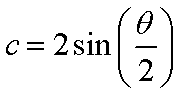
                                                                                The general equation to compute the length of the chord is given by the equation below

                                                                                For simplicity will pick R to be 1. The above equation now simplifies to the following


                                                                                The above concepts and math was implemented in the following code using Python 3.6.

                                                                                import math
                                                                                
                                                                                def create_hours_minutes_in_a_day():
                                                                                    number_of_hours_in_day = 24
                                                                                    number_of_minutes_in_an_hour = 60
                                                                                    number_of_minutes_in_a_day = 0
                                                                                    hours_minutes_in_day = []
                                                                                    for hour in range(0, number_of_hours_in_day):
                                                                                        if hour < 10:
                                                                                            hour_to_print = '0' + str(hour)
                                                                                        else:
                                                                                            hour_to_print = str(hour)
                                                                                        for minute in range(0, number_of_minutes_in_an_hour):
                                                                                            if minute < 10:
                                                                                                minute_to_print = '0' + str(minute)
                                                                                            else:
                                                                                                minute_to_print = str(minute)
                                                                                            hours_minutes_in_day.append(hour_to_print+':'+minute_to_print)
                                                                                            number_of_minutes_in_a_day += 1
                                                                                    return hours_minutes_in_day, number_of_minutes_in_a_day
                                                                                
                                                                                def map_hour_minute_in_day_to_circle(hour_colon_minute_in_day, number_of_minutes):
                                                                                    number_of_degrees_in_a_circle = 360
                                                                                    increment_size_in_degrees = number_of_degrees_in_a_circle / number_of_minutes
                                                                                    current_angle_in_degrees = 0
                                                                                    map_hour_minute_to_circle = dict()
                                                                                    for x in hour_colon_minute_in_day:
                                                                                        map_hour_minute_to_circle[x] = current_angle_in_degrees
                                                                                        current_angle_in_degrees += increment_size_in_degrees
                                                                                    return map_hour_minute_to_circle
                                                                                
                                                                                def compute_arc_length_between_time_interval(mapping_of_hour_minute_to_angle, time_a, time_b):
                                                                                    # Since we want the relative distance betwee two time intervals, 
                                                                                    # can set the circle to a radius = 1
                                                                                    angle_a = mapping_of_hour_minute_to_angle[time_a]
                                                                                    angle_b = mapping_of_hour_minute_to_angle[time_b]
                                                                                    chord_length = 2 * math.sin ( math.radians(angle_b - angle_a) / 2 ) 
                                                                                    print("Time A: ", time_a, "Angle A: ", angle_a)
                                                                                    print("Time b: ", time_b, "Angle A: ", angle_b)
                                                                                    print("Chord: ", chord_length)
                                                                                    print("---")
                                                                                
                                                                                hour_colon_minute_in_day, number_of_minutes = create_hours_minutes_in_a_day()
                                                                                
                                                                                map_hour_minute_to_angle = map_hour_minute_in_day_to_circle(hour_colon_minute_in_day, number_of_minutes)
                                                                                
                                                                                compute_arc_length_between_time_interval(map_hour_minute_to_angle, '00:00', '06:00')
                                                                                
                                                                                compute_arc_length_between_time_interval(map_hour_minute_to_angle, '00:00', '12:00')
                                                                                
                                                                                compute_arc_length_between_time_interval(map_hour_minute_to_angle, '00:00', '18:00')
                                                                                
                                                                                compute_arc_length_between_time_interval(map_hour_minute_to_angle, '00:00', '23:59')
                                                                                

                                                                                The output from the above code is below

                                                                                Time A:  00:00 Angle A:  0
                                                                                Time b:  06:00 Angle A:  90.0
                                                                                Chord:  1.4142135623730951
                                                                                ---
                                                                                Time A:  00:00 Angle A:  0
                                                                                Time b:  12:00 Angle A:  180.0
                                                                                Chord:  2.0
                                                                                ---
                                                                                Time A:  00:00 Angle A:  0
                                                                                Time b:  18:00 Angle A:  270.0
                                                                                Chord:  1.4142135623730951
                                                                                ---
                                                                                Time A:  00:00 Angle A:  0
                                                                                Time b:  23:59 Angle A:  359.75
                                                                                Chord:  0.0043633196686735124
                                                                                ---


                                                                                Wednesday, June 14, 2017